Reverse Image Search for OSINT: Tracing Photos Online

A profile photo appears under two names. A rental listing uses a picture someone recognizes. A photograph circulates without a clear source. Reverse image search can show where that image appears online and what surrounds it.
In open-source intelligence, investigators use these searches to trace image reuse and develop leads. The work starts by deciding whether the question calls for copies of the same photo, visually similar images or a specialist face search, then inspecting the matching pages and recording what the results establish.
In this article, we examine how to choose between search methods and how to interpret results, including the limits of social media coverage and the privacy checks that come before any upload.
The method starts with a picture instead of a text query. The searcher submits an image file, screenshot or image URL, and the provider compares the image against its index and returns related images and webpages. A result is a lead to a page that can be read, not a verdict on where the photo began or who appears in it.
Image-search tools serve different purposes: finding copies, locating visually similar images or, in specialist services, comparing faces. Copy matching looks for the same photograph, including cropped, resized or filtered versions. Visual search looks for pictures that resemble the query, such as the same landmark or product photographed by someone else.
TinEye’s documentation draws the line clearly. It states that the service finds exact and altered copies and that it “cannot find different images featuring the same people or objects.” A copy match is an exact image match or a close edit of it, while a similar image shows only that two pictures look alike.
Face matching compares facial features rather than whole images, so it can relate different photographs of what may be the same face. Its output is a set of candidates, and the limits of that output are covered in the comparison with facial recognition below.
Three situations recur in practice.
A reused portrait. A profile photo that appears under another name or on an unrelated page is a reason to question the account behind it.
A questionable listing. Photos from a rental or marketplace listing that also appear under another location or seller suggest the listing needs closer checking.
An attribution check. Photographers and illustrators use copy matching to find where published work has been reused, and image attribution then rests on independent evidence of authorship.
According to Google’s search help, a desktop search can start from google.com with Search by image, using an uploaded file, a dragged file or a pasted image link, and Chrome offers a Search with Google Lens option on right-click. Results can include similar images and websites that have the image or a similar one.
The TinEye tutorial lists four inputs: dragging a file onto the page, pasting from the clipboard, uploading a file and entering an image URL. A URL search gives the same results as an upload, so an image URL suits a file hosted online, and a local copy can be uploaded otherwise.
On both Android and iPhone, Google’s Lens help page describes one route: open the photo in the Google Photos app, tap More, then tap Google Lens. A screenshot works as an input when the original file is unavailable, but interface elements and compression can reduce match quality, so it is cropped to the photograph first.
A match becomes useful once the page is read, and a matching page is not automatically the original source page. The page text, caption, upload date and account name show how the photo was used, and the original file should be compared with the page version for crops, edits and watermarks.
Investigating the original source takes a comparison of publication dates, archived pages and evidence of authorship, since a matching page alone does not establish provenance. TinEye’s compare feature switches between a match and the searched image with the matching areas aligned, which makes small differences easier to see. Professional workflows that build on this stage are covered in how investigators use reverse image search in practice.
Method selection starts with the question the image needs to answer: whether the same photograph appears elsewhere, whether related pictures exist, or whether a face has candidate matches. Each mode returns a different kind of lead, and the choice sets how much corroboration the result needs.
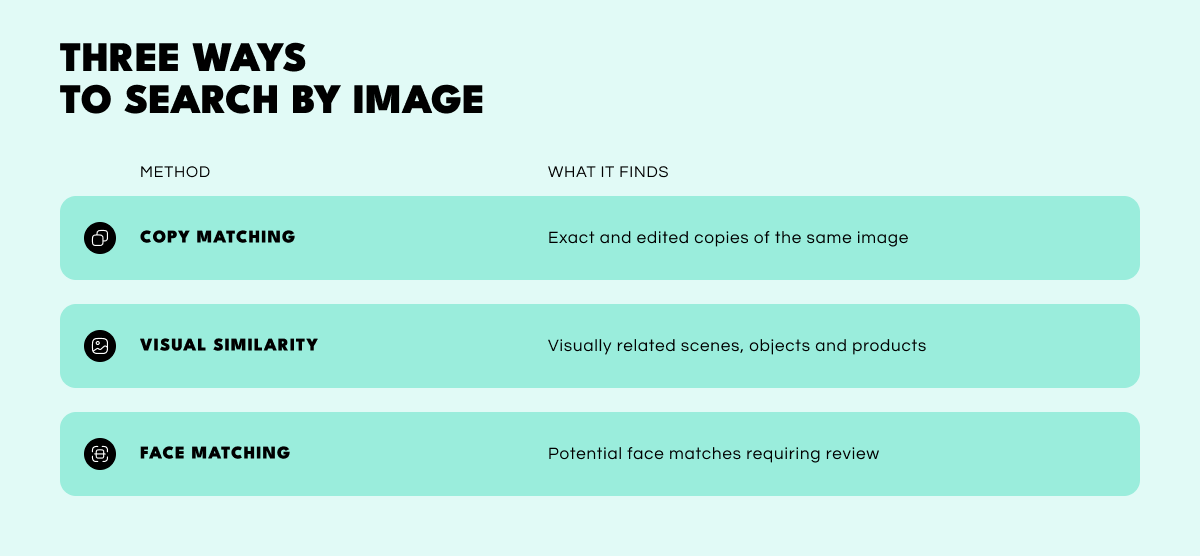
Copy matching. Finds exact and edited copies of the same image, which makes it the best fit for reposted or edited versions of a known photo. A match shows the same composition on a page, and it does not show who uploaded it or whether the page is the original source. For suspected photo reuse, copy matching is the starting point.
Visual similarity. Finds visually related scenes, objects and products, which suits questions about visual resemblance rather than copies of the same photograph. A result shows similar appearance and not that two pictures are the same photograph, so each one needs a check for details that separate it from the query.
Face matching. Finds potential face matches across different photographs. A result is a candidate that requires review and not an identity, and it needs different handling from the other two modes, as the next section explains.
Searches that involve people raise two questions that are easy to blur: whether the same photograph is reused, and whether the same face appears in different photographs. Copy matching addresses image reuse; specialist face matching looks for candidate matches across different photographs.
A reused portrait is the same photograph under another name, which copy matching can show. A facial recognition search addresses the second question, the same face in different photographs, which is a similarity claim about people and needs far more support. The Federal Trade Commission’s romance scam guidance advises a reverse search of a profile picture and says that associations with another name or mismatched details are “signs of a scam.”
Face-matching systems can return a false positive match, so candidate results require review. In the investigation mode of the NIST Face Recognition Technology Evaluation, a human reviewer examines the returned candidates, including searches where the person is not in the gallery at all. NIST’s figures describe the algorithms it tests and not any particular consumer service.
Image quality, angle, lighting and age raise the chance of error. Each candidate is assessed against independent evidence, and a shared username or location may strengthen a lead, but neither confirms identity on its own. The overview of facial recognition in OSINT covers the legal and ethical limits for professional use.
External image searches depend on what the provider has indexed. They do not bypass social-media privacy settings, but publicly reposted or previously indexed copies may appear even when the current post is private or unavailable.
Providers differ on social platforms. TinEye states that it does “not typically add social media images (Facebook, Instagram, Twitter etc.) to our index” and that most social media sites prohibit indexing of their users’ images, as its index documentation explains. General-purpose engines may surface publicly indexed pages that carry an image, but coverage of any platform varies by provider and changes over time. A result may point to a page that has since changed or become unavailable.
When image searches return nothing, the picture often holds text clues: a name on a sign or badge, a business, a location, a username in a screenshot or a caption on the page where the image was found. These clues can be searched in a standard search engine and in the platform’s own search, within the account’s privacy settings and the platform’s rules.
Text searches offer another way to look for relevant Facebook posts or profiles. Social media investigation combines these text searches with account and network analysis.
Two common mistakes are treating no result as proof of uniqueness and treating the oldest result as proof of authorship.
A tight crop, a low-resolution copy, a filter, a mirrored frame or a screenshot can all defeat a match. A cropped image removes context, and low image resolution removes detail. Repeating the search on the full frame and on the subject, and trying a higher-resolution version when one exists, can change the outcome. TinEye’s sorting options help here: Biggest image puts the highest-resolution matches first, and Most changed puts heavily edited versions first.
No provider’s image index is complete, so an empty result may mean the image is original, unindexed or edited beyond recognition. Date sorting needs equal care. TinEye’s Oldest option shows the earliest found images, yet its documentation notes that “the date TinEye crawled an image isn’t the date that it first appeared on the webpage.” Crawl date, publication date and authorship are three different facts, and only the last establishes who made the image.
A matching page can also be live, changed or removed, so pages that matter are captured promptly, following the same logic as evidence preservation in any investigation.
Photo privacy depends on how a provider handles each image upload, and retention terms change. As of 10 November 2026, Google’s help page notes that it may store the URLs that are searched, while TinEye states that it never saves uploaded images, never adds them to its database and deletes the upload immediately after showing results, according to its upload policy.
Google also offers a Visual Search History setting, which is off by default and, when on, can save searched images to the account’s Web & App Activity, so the account settings deserve a check alongside the provider’s retention policy. Each provider’s current retention, deletion and sharing terms are read before an image is submitted.
Owned or consented images are the better choice for test inputs, and a sensitive or intimate image does not belong in any public tool. A visual lead is a prompt for further checking and not grounds for a public allegation.
Both examples are hypothetical illustrations, not tested cases, and no success rates are implied.
A modified image that matches. Consider a hypothetical example in which a photographer keeps the original file of a landscape she published on her own site. A travel listing later shows a cropped, filtered version. She runs copy matching on the full frame and then on the crop, and a listing page with the same composition appears. She opens the page, captures it with its date and records that the composition appeared there at that time. The next step is to contact the site operator or use its reporting process.
An inconclusive search. In a second hypothetical example, an analyst receives a cropped, low-resolution headshot from a chat profile. Copy matching returns nothing, and a visual search returns only portraits of unrelated people. The record lists the provider, the date, the crops tried and the result type, and it states that no public source was located by these methods on that date. The analyst then turns to username consistency, text clues and independent corroboration.
Reverse image search turns a single picture into a set of leads. Matching the method to the question determines what a result can show and how much corroboration it needs, whether that means copy matching for reposts, visual similarity for related scenes or face matching for candidate faces.
The value lies in the routine around the search. Saving the original, opening each matching page and recording what matched, what did not and what the page does and does not establish keeps the work repeatable and easy to review. A match is a lead to be verified, and treating it that way is what separates a careful image trace from a guess.
Reverse image search can locate copies or related images; specialist face-search services may also return candidate matches. Neither result alone confirms identity.
External methods can search a permitted image and may surface publicly indexed copies, but coverage varies by provider. Text clues and the platform’s own search offer a second route within its privacy settings.
The image may be unindexed, heavily cropped, low in resolution or edited beyond a match. Repeating the search on a different crop or a higher-resolution version can help.
No. The oldest result reflects when a provider found an image, not when it was published or who made it. Publication dates and independent evidence of authorship are needed for attribution.
It depends on the provider. Retention and deletion terms differ and change, so the current terms are read before uploading.
Want to see how OSINT can help investigators run image searches, compare related profiles and document what each result establishes? Book a personalized demo to explore how SL CrimeWall brings image and face search, link analysis and investigative records together in one platform.